AI Agents for Product Managers: automating Ticket-to-PR workflows with Cursor and Linear
By Bart Etcheverry - 2 April 2026
5 Min Read
There's an expectation in most businesses right now that PMs should be using AI. Leadership wants to see it. Clients are asking about it. The problem is that "using AI" often ends up meaning ChatGPT for meeting notes or first-draft PRDs. Useful, but not exactly transformative.
At Planes, we're looking at how we can use AI to free ourselves up to do more of the work that moves the needle. The strategic, creative, deeply human work that no prompt can replace.
Recently, we've been experimenting with building agents that handle the small, repetitive tasks quietly eating into our time. As PMs, this experimentation is also opening up new remits for who can execute work. Helping us remove bottlenecks, spend less time on the tasks that chip away at our day, and more time on the work that actually matters.
Below, we document one use case we've been running ourselves: a ticket-to-agent workflow that takes a Linear ticket and turns it into a pull request.
Does every ticket need a developer?
Sprint backlogs have two kinds of work. There's the complex, strategic stuff: architecture decisions, new features, problems that need deep thinking and hard-won expertise. And then there's everything else: copy changes, styling fixes, small config updates, and logic tweaks. Well-defined tasks that still eat into calendar time and often become an impending queue of interruptions.
The question we started asking was: does every ticket in that second category need to go through a developer
The Basic Idea:
Ticket → Agent → PR
The workflow works like this:
You write a ticket in Linear. You describe what needs to change — clearly, specifically, the same way you'd brief a developer. You assign the ticket to an AI agent. Then you wait about five minutes.
What happens in the background: the agent reads the ticket, opens the repository, inspects the relevant code, makes the changes, pushes a new branch, and opens a pull request.
From there, it goes to human review. That's the whole loop: ticket to PR, no developer involvement until the review stage.
So, what tickets does this work for?
This workflow is designed for a specific tier of work; tasks where the requirement is unambiguous and a clear brief produces a predictable output.
That means:
Copy changes and label updates
Colour and styling fixes
Small logic or config changes
We wouldn't recommend one-shotting complex, multi-file changes that require architectural judgement. Stick to tasks where the requirement is unambiguous.
The dishwasher analogy
Think of it like loading the dishwasher. Nobody enjoys doing the dishes, it doesn't require specialist skill, and the machine does the actual work while you get on with something else. You come back, check everything came out clean, and put it away.
The agent works the same way. You load it with a well-written brief — the ticket — set it going, and come back to a pull request ready to review. The work happened without you standing over it.
The point isn't that it replaces the cooking. It's that it frees you up to do it.
Product and delivery teams can start taking ownership of execution on clearly scoped tickets. That means fewer distractions for developers, who get to stay focused on the chunky stuff — the complex bits, the architecture decisions, the strategic conversations that really need them.
Guardrails: humans still in control
Nothing merges into main without a human review, and that includes a developer looking at the code before it goes anywhere near production.
The loop is: agent opens a pull request on a new branch → you get a Vercel preview link to check the change looks right → a developer does a code review in GitHub → then it merges.
The agent does the work; the developer still owns the quality gate.
Ticket quality matters here too. A vague brief produces a vague result.
A useful test: if you can write the ticket clearly enough that a new developer on their first day could implement it without asking questions, the agent can handle it. That same specificity raises the standard of documentation across the team as a side effect.
How to set it up: Linear + Cursor
Here's a practical step-by-step for getting this running. We're focusing on Linear because it gives the cleanest experience — ticket creation triggers the agent automatically, with no manual prompting from inside the IDE.
What you'll need
A Linear account with a project set up
A GitHub repository connected to Linear
Cursor installed (cursor.com)
A Vercel account connected to your GitHub repo
Step 1 — Set up a Cursor account
You'll need Cursor on a Pro or Ultra plan — the background agent runs in Cursor's cloud, so you don't need the desktop app open while it works. Sign up at cursor.com.
Step 2 — Connect Cursor to Linear
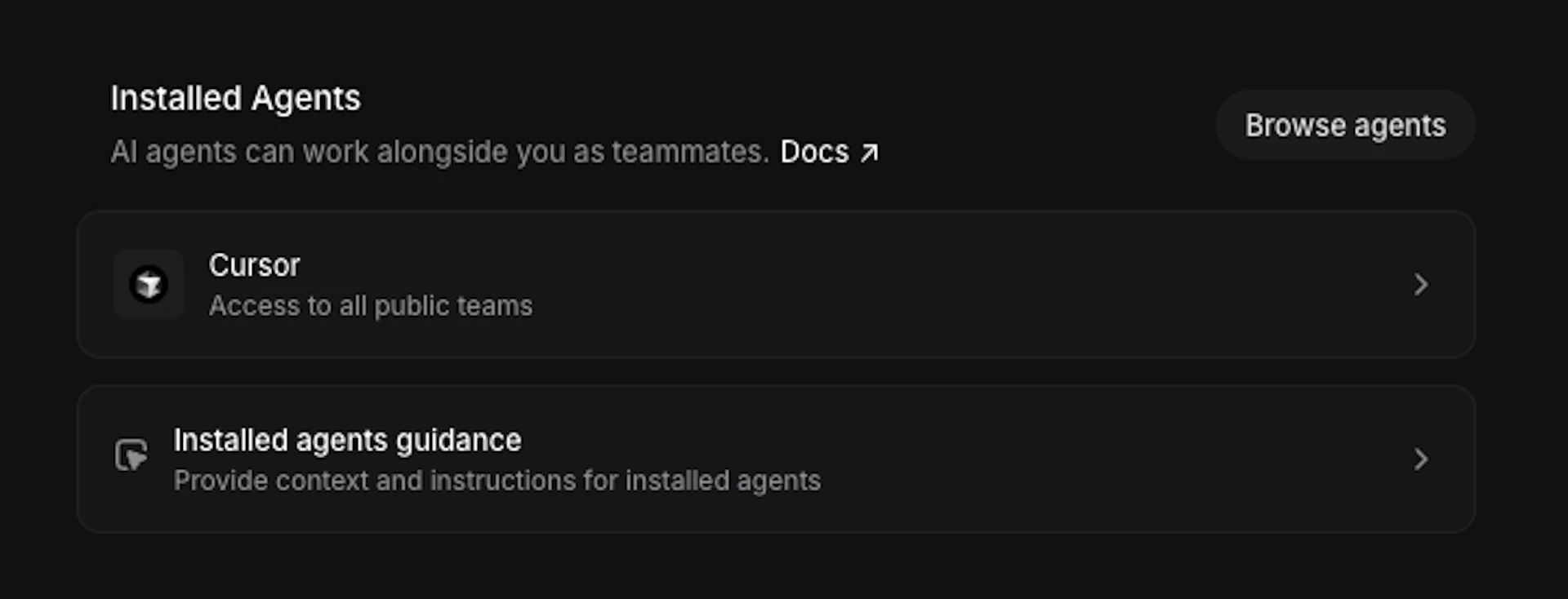
In Linear, go to Settings → AI & Agents. You'll see Cursor listed as an available agent. Connect it and authorise access to your GitHub account. This is the step that wires everything together.
Step 3 — Connect Linear to your GitHub repository
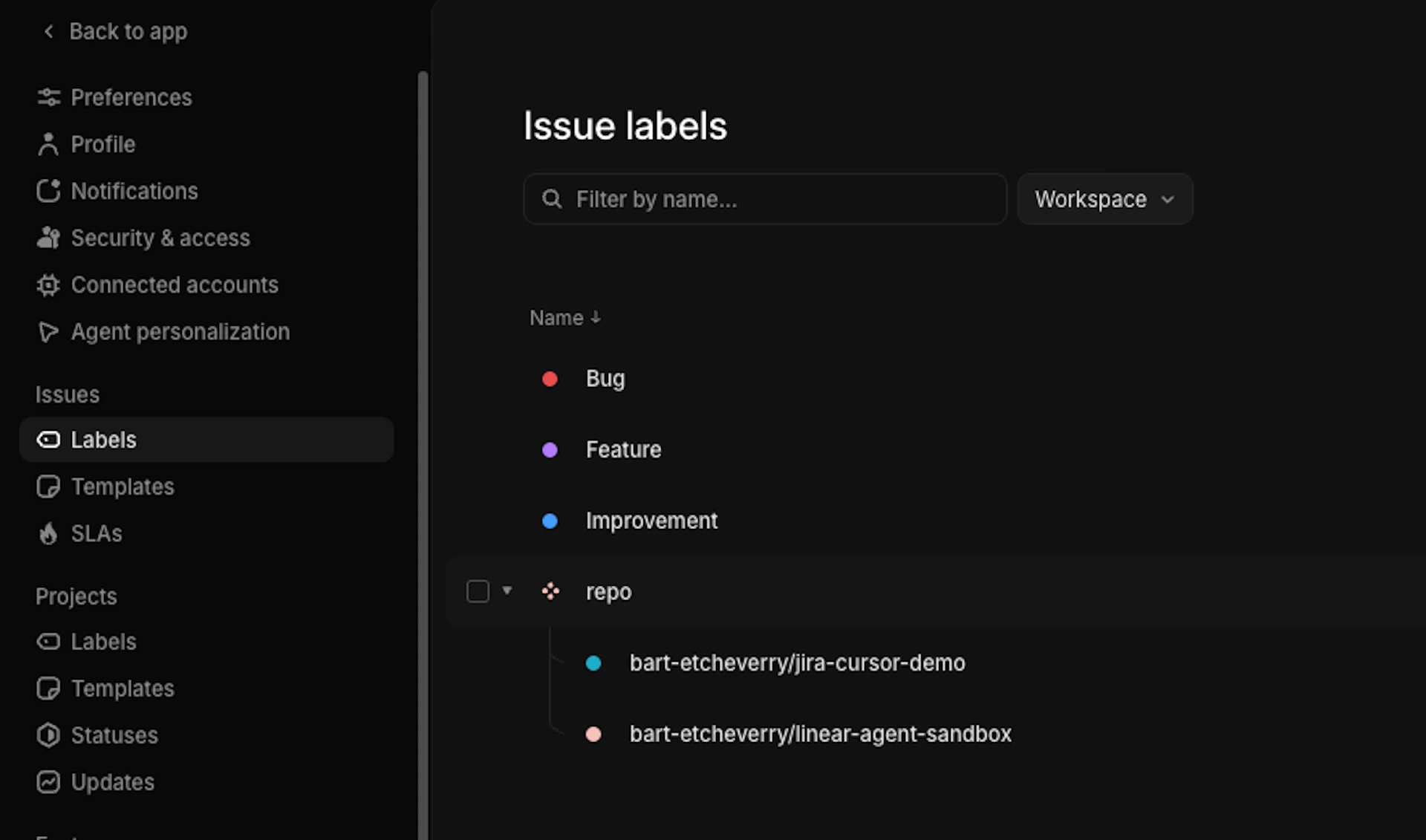
In Linear, go to Settings → Labels. Create a label group called repo. Under it, add a label named after your GitHub repository — for example, yourname/your-repo. This tells Linear which codebase to send the agent to when a ticket is assigned.
Step 4 — Connect Vercel for preview links
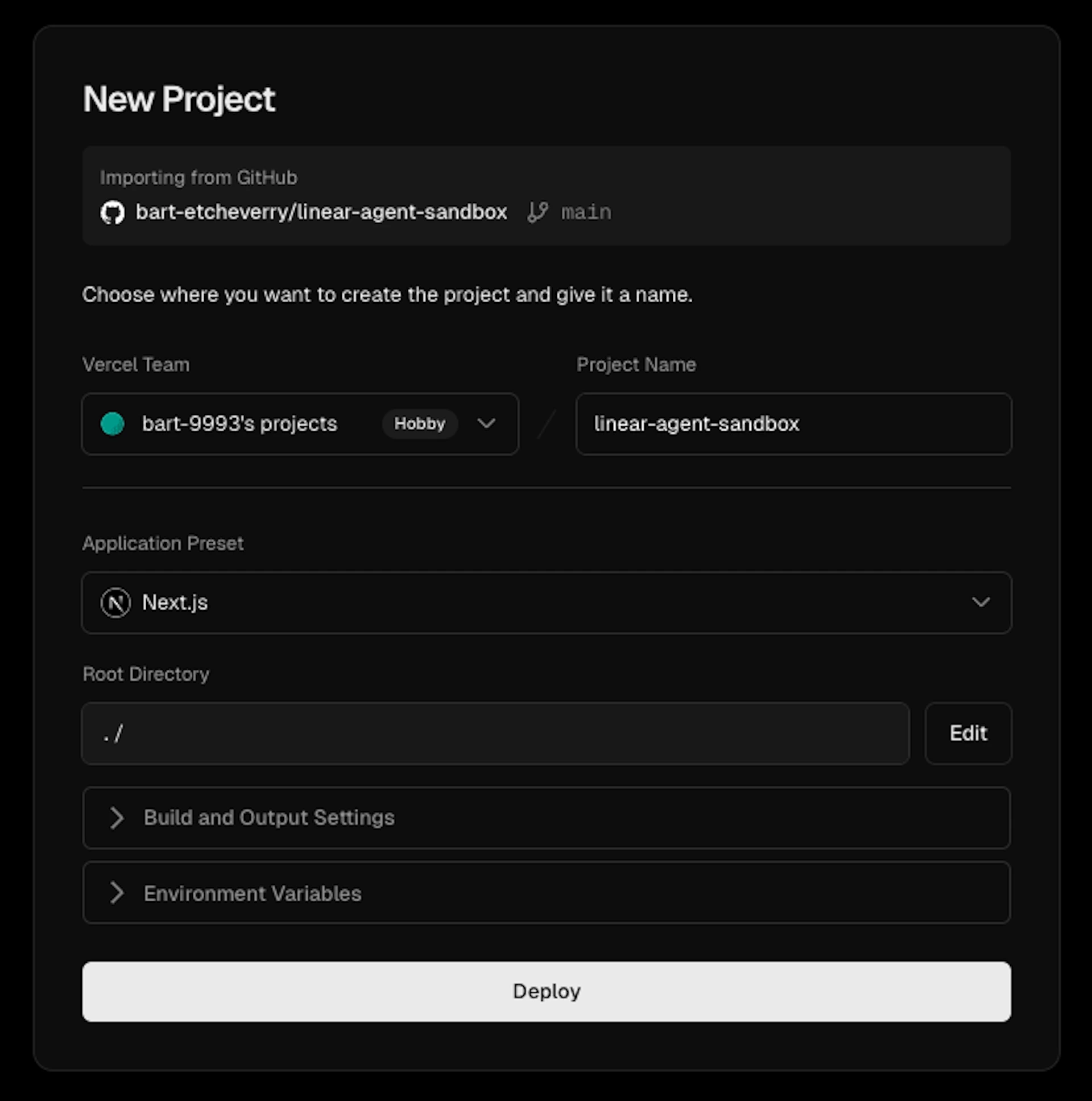
Go to vercel.com, sign in with GitHub and import your repository with default settings and deploy. From this point, every pull request will automatically generate a unique preview URL within about 30 seconds of the PR being created.
Step 5 — Write and assign your first ticket
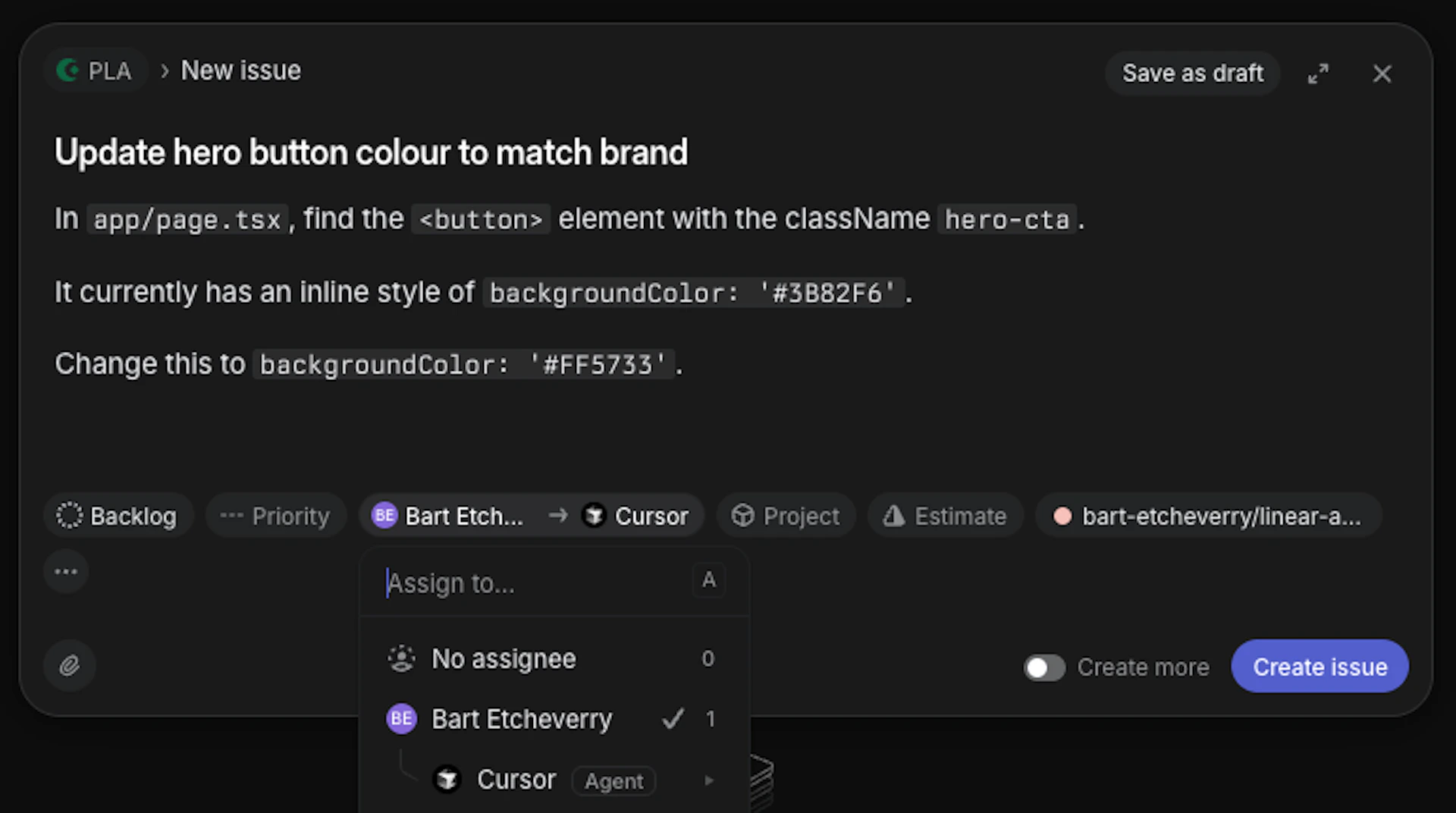
Create an issue in Linear. Be specific — the exact file (if known), the exact string to change, and exactly what to change it to. Apply your repo label, then assign the ticket to the Cursor agent. Watch the pull request appear in GitHub, click the preview link, review, and merge if it looks right.
Step 6 — Iterate on your ticket writing
The first few tickets will teach you where the gaps are. If the agent misses something, it's usually because the brief was ambiguous — the agent needs to find the exact code, not just understand the intent. Tighten the description, add more specifics, and try again.
Linear vs Jira
If your team uses Jira, you can still run this workflow, but it’s a little bit more fiddly to set up and works slightly differently.
With Linear, assigning the ticket triggers the agent automatically in the background. With Jira, you trigger the agent manually from inside Cursor's Composer by pointing it at a specific ticket. Both achieve the same result — Linear just removes the manual step, which makes it cleaner for a first demo or proof of concept.
Using Claude Code
You can run the same workflow using Claude Code instead of Cursor. There's no native Linear integration out of the box, but plugins are available that connect the two. Once set up, the flow is the same — assign the ticket, agent does the work, pull request lands for review.
What does this mean for the future of tools like Linear?
It's a starting point. Right now, we're in the 'let's try and learn about these features and be in front of it' stage.
The longer-term question is what this means for how teams document and specify work. In a world where a well-written ticket can trigger an agent to make a live change, the quality, context and clarity of your requirements matter more, not less.
When we demoed this to the full team, our CTO Henry put it well:
Linear is evolving into something bigger than a project management tool. A central hub for all the specs and details of your system, one that can spin off agents to go and make changes that reflect the latest version of the application. The ticket isn't just a brief for a developer anymore. It's an instruction set for an agent.
We're not there yet. But this workflow is the next step in that direction, and it's one any product team can start with this week.
The product teams that will stay ahead in the era of AI, are the ones experimenting, figuring out which tools to use and why.
When PMs can take a ticket all the way to a PR, developers get their time back for the work that really needs them. Because ultimately, the goal isn't to replace the human work. It's to protect it.
Want to get your team building AI workflows like this?
We're running hands-on AI Essentials sessions tailored to where your business actually is on its AI journey. You'll build confidence with the tools best suited to your business, sharpen your prompting skills, and explore agentic workflows - like the one above.
We're already working with teams across wealth management, news media, insurance and healthtech.
If you'd like to chat about booking a session email hey@planes.agency.